
Safety and control
Choose how commands run, when approval is needed, and which project settings can execute code.
Choose a safety preset
Press Ctrl+S from the message field on any keyboard path. Alt+S remains an enhanced-keyboard accelerator when the terminal delivers Alt or Option as Meta/Esc+. Direct iTerm sessions preserve ordinary Option text, accents, and dead-key composition. You can always open the same controls through /settings/controls.
| Preset | Command location | Risk decision |
|---|---|---|
free | Directly on the host | No approval |
judged | Directly on the host | Model judge; uncertainty asks you |
approval | Directly on the host | Always asks when review is required |
isolated | Native sandbox | Autonomous |
reviewed | Native sandbox | Model judge; uncertainty asks you |
protected | Native sandbox | Always asks when review is required |
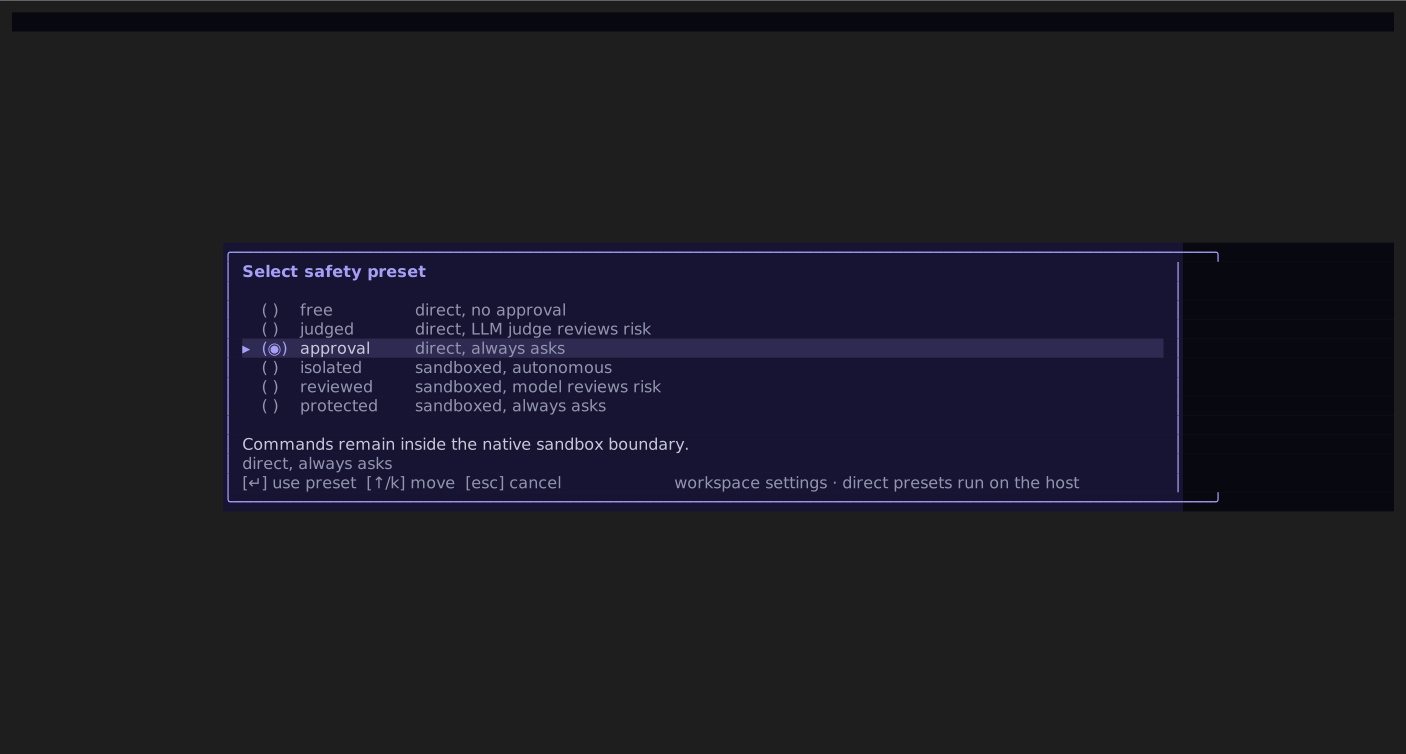
Clarvis asks for an extra danger confirmation before applying free or judged, because both remove the sandbox boundary. A custom label means the current sandbox and command-review settings do not exactly match a named preset.
WARNING
Sandboxing and review solve different problems. A sandbox limits where a process can act. Command review decides whether a command should run. Use both when work is untrusted or consequential.
Verify sandbox availability
The command sandbox selects Bubblewrap on Linux and Seatbelt on macOS. Other platforms report the native backend unavailable. With availability: "required", a host without a usable selected backend fails the run instead of silently running commands directly. With availability: "optional", the same host may fall back to direct execution.
Open /settings/sandbox or /doctor to inspect availability. You can further restrict the sandbox to a read-only workspace or disable network access for the shell and monitor_start processes. This setting does not contain model calls, remote MCP servers, hooks, or direct ! commands. File-editing tools also run outside this command sandbox and use the separate path-confinement boundary described in Security.
The native sandbox provides one run-owned scratch directory and also admits compatible host temporary roots: the environment-selected temp directory on every platform and /tmp on POSIX. Those compatibility roots are writable but are not Clarvis-owned private storage; other local processes may use them.
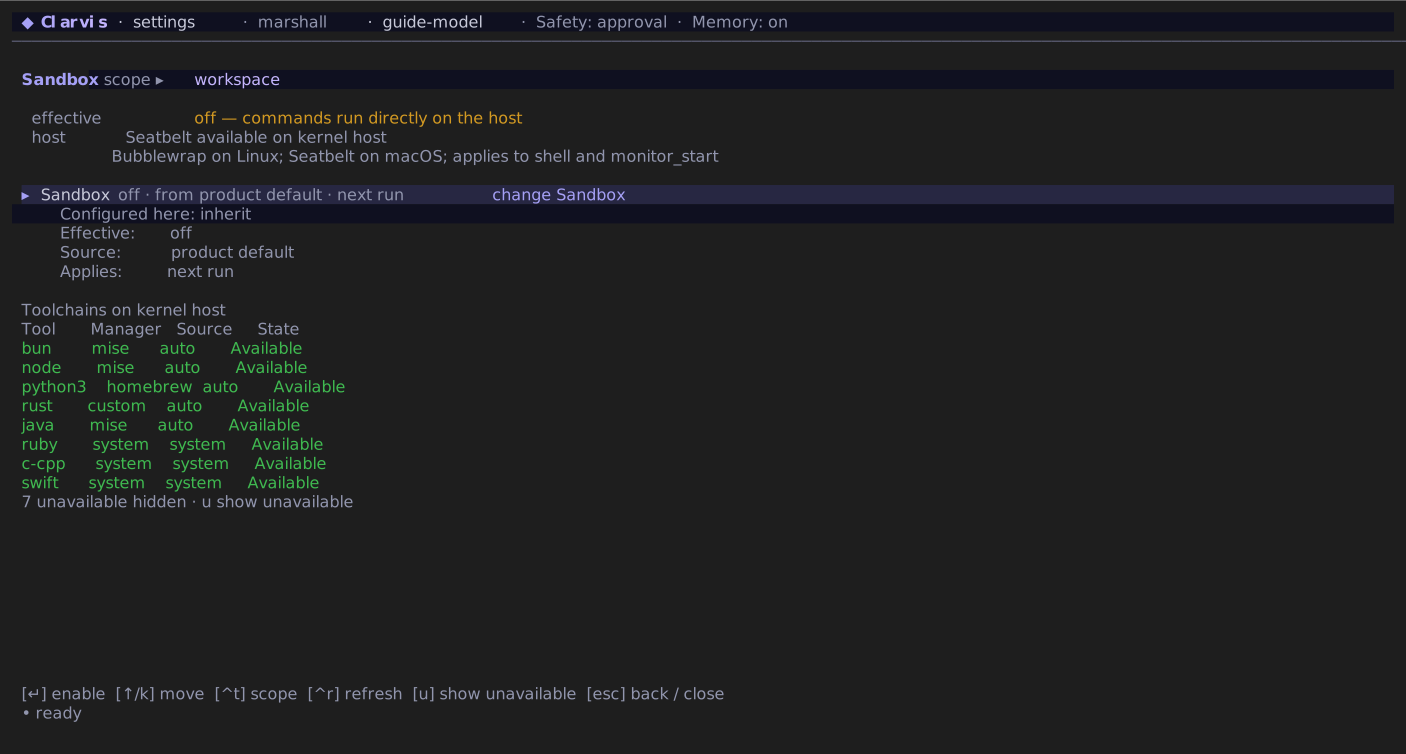
Make host tools available in the sandbox
Clarvis discovers supported language toolchains from the host environment when it starts. The known toolchain IDs are bun, node, python3, python, rust, go, java, dotnet, ruby, deno, php, zig, c-cpp, kotlin, and swift.
For the normal case:
- Start Clarvis from a shell where the toolchain is already on the host
PATH. - Open
/settings/sandboxand enable the sandbox. - Keep Toolchain discovery on
auto. - Optionally edit Included toolchains to a space-separated subset such as
bun node rust. - Press Ctrl+S, then start a new run.
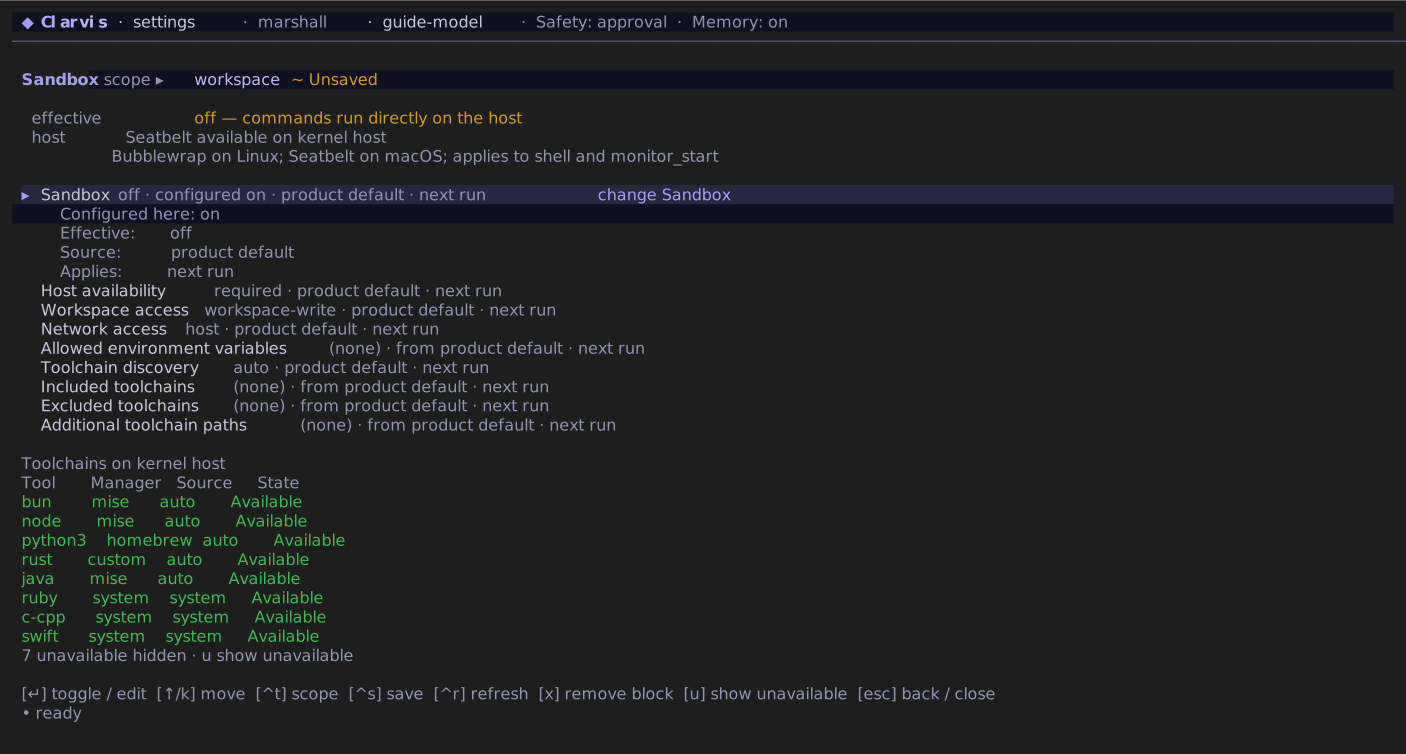
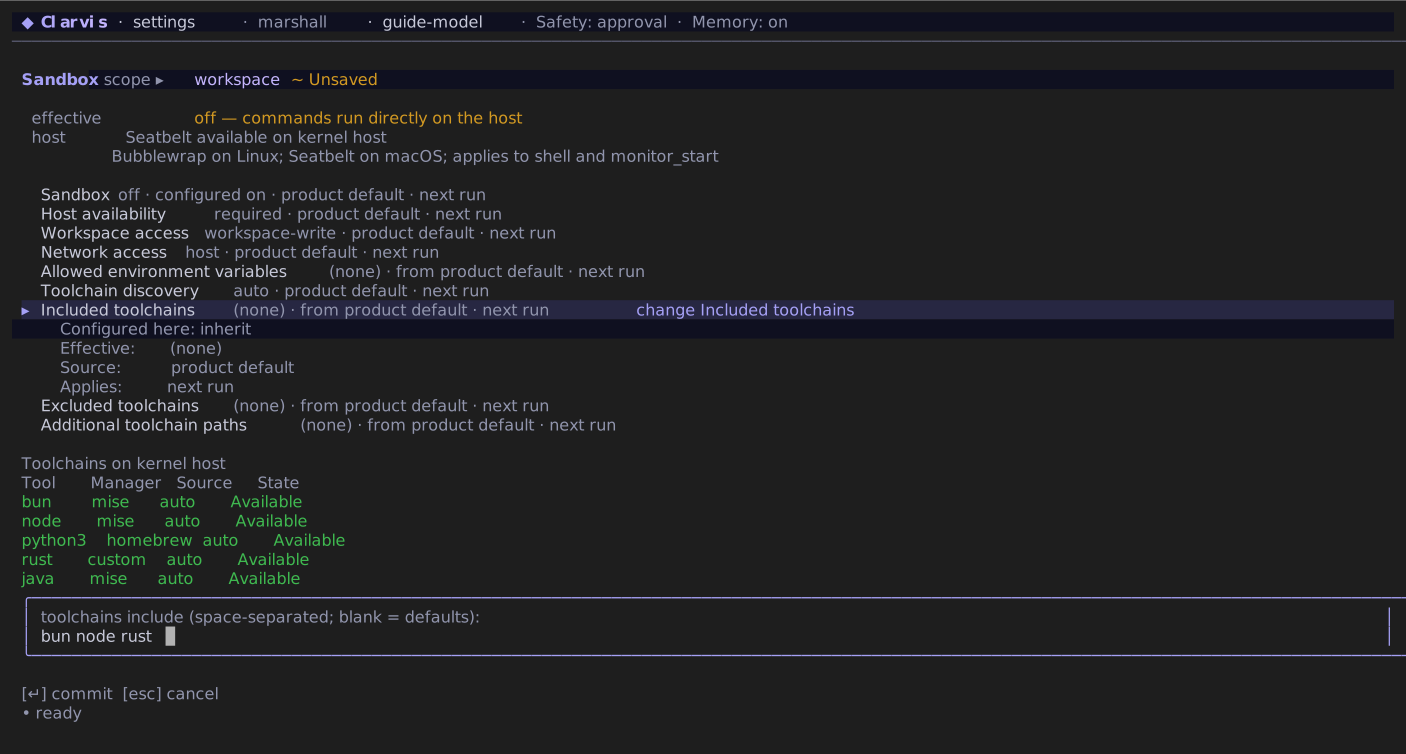
The inspection at the bottom of the screen shows which toolchains were found, whether each one is enabled, and the effective sandbox PATH. Discovery is passive: Clarvis resolves executable paths and install roots but never runs cc, java, bun, or another discovered entrypoint merely to populate this screen. A toolchain marked Available has a resolvable executable path; this is not a version or runtime self-test. The equivalent settings are:
{
  "sandbox": {
    "type": "native",
    "enabled": true,
    "availability": "required",
    "toolchains": {
      "mode": "auto",
      "include": ["bun", "node", "rust"]
    }
  }
}
On Apple silicon, /opt/homebrew/bin and the matching Homebrew Cellar targets are recognized system tool roots. They remain read-only inside Seatbelt and do not need an extra_paths entry. Other custom SDK or binary directories still use the flow below.
Expose a custom binary directory
An arbitrary SDK or binary directory is not a known toolchain. To make its executables available:
- Open
/settings/sandbox. - Open Additional toolchain paths.
- Enter one or more absolute directories separated by spaces, such as
/opt/company-sdk/bin. - Press Enter, then Ctrl+S.
- Start a new run and invoke the binary by its absolute path or extend
PATHfor that command.
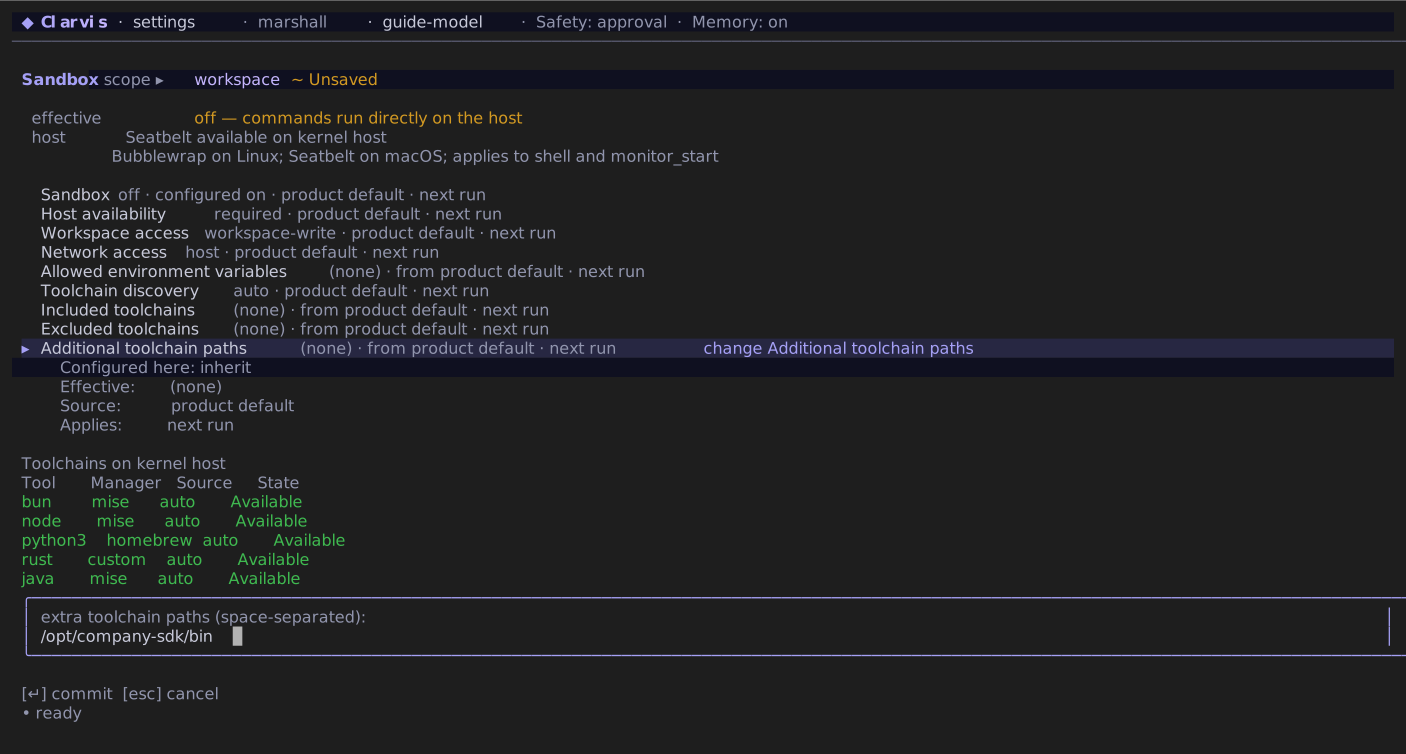
This setting makes the directory visible by mounting it read-only:
{
  "sandbox": {
    "type": "native",
    "enabled": true,
    "toolchains": {
      "extra_paths": ["/opt/company-sdk/bin"]
    }
  }
}
Replace the example with a directory that already exists on the kernel host. A missing path may remain configured, but the inspection marks it unavailable and the sandbox does not mount it. Global entries must be absolute paths. extra_paths does not permanently append the directory to the sandbox PATH. Invoke the binary by its absolute path:
/opt/company-sdk/bin/acme --versionOr extend PATH only for the command that needs it:
PATH="/opt/company-sdk/bin:$PATH" acme --versionThis keeps the rest of the run on Clarvis's filtered PATH. Do not add PATH, HOME, TMPDIR, TEMP, or TMP to pass_env; those names belong to the sandbox environment, not ordinary values that should be copied from the host.
Review commands
The command guard has three modes:
offperforms no command-review ruling;onasks you when a command needs approval; andautoasks a model judge, then falls back to you when it cannot decide.
Explicit deny rules are enforced before approval and win over allow rules. Safety preset changes preserve existing allow and deny patterns.
On first setup, Clarvis seeds a visible global starter allowlist for conventional inspection, build, test, lint, and type-check commands across common language ecosystems. It never expands an existing list, including an empty one. Generic interpreters and task runners, package installation, publishing, deployment, and migration commands remain reviewable. This allowlist controls approval; it is not process containment, so keep the native sandbox enabled when isolation is required.
Configure the policy globally or per workspace in settings.json:
{
  "guard": {
    "type": "shell",
    "mode": "on",
    "allowed_commands": ["git status", "bun test"],
    "denied_commands": ["git push --force*", "rm -rf /*"]
  }
}
An entry without * is a space-boundary prefix over the normalized command. An entry containing * is an anchored glob. Every shell segment must satisfy the policy: a deny match rejects the whole command, an allow match permits that segment, and an undecided segment follows the selected guard mode.
For a project-specific judge policy, create .clarvis/guard-judge.md:
Approve read-only inspection and focused test commands.

Ask me before publishing, deploying, deleting, changing credentials, or modifying infrastructure.

Never approve a command that pipes a network response into a shell.
This is the only file-based guard prompt override. Precedence is the non-blank workspace file, then the non-blank global ~/.clarvis/guard-judge.md, then Clarvis's built-in judge prompt. The files are not concatenated. An unreadable, blank, or oversized file is treated as absent and falls through to the next source.
Review workspace trust
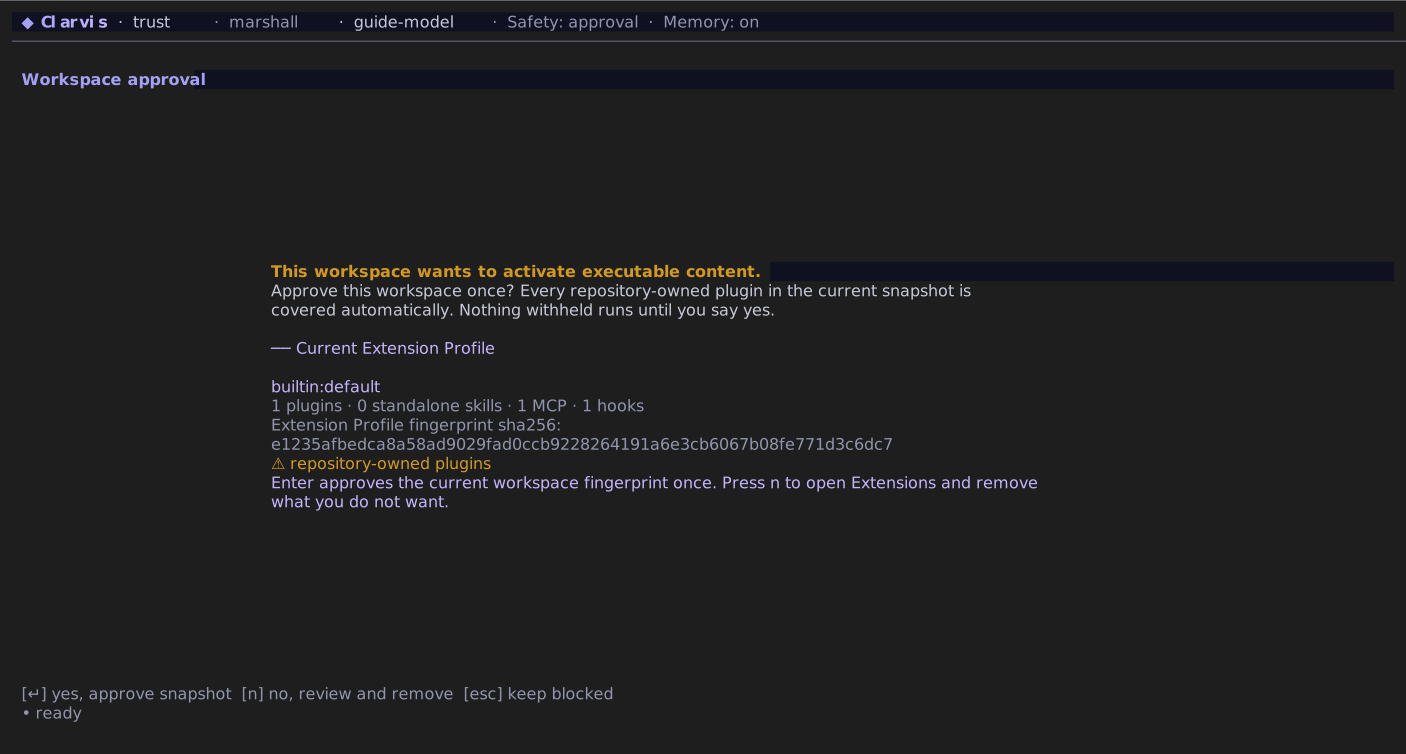
A repository cannot activate its own executable configuration merely because you opened it. Clarvis withholds workspace hooks, MCP servers, settings-based plugin selections, every repository-owned workspace plugin, executable feature providers, and agent instructions until you approve the exact protected surface or run /workspace-trust. Globally installed plugins remain active because installing them was already an operator consent action.
The workspace fingerprint includes the complete repository plugin inventory before Extension Profile selection. One approval therefore covers Extension Profile switches until plugin content or another protected workspace field changes; adding a plugin or changing its fingerprinted contribution surface requires review again.
Subscription-provider declarations are a permanent exception: workspace approval never activates them. Configure subscription providers globally. A workspace may only select a subscription model that is already enabled there.
Review the named surfaces before approving. Changing that executable surface changes its approval fingerprint and requires another review. Running /workspace-trust again on a trusted workspace revokes approval.
Keep direct actions distinct
DANGER
Composer input beginning with ! is a direct local shell command. It bypasses the agent's sandbox and command-review path. Run it only when you have personally reviewed the complete command.
Likewise, do not place secrets in prompts, agent bodies, skills, hooks, workflow briefs, or committed settings. Use provider credential controls or environment references instead.