
Plugins
Add agents, skills, tools, and automation together in one plugin.
Manage plugins in the TUI
Type /extensions, then press m to open the unified Plugins browser.
- Left and right move between All, Installed, each marketplace, Workspace, and Add Marketplace.
- Up and down move through the selected collection.
/searches it, and Enter opens scrollable details. - Details show the exact inventory identity, current Extension Profile state, revision, agents, skills, MCP servers, hooks, services, executable commands, and source notes before any mutation.
- Press Enter again on an available listing to install and activate it. Press
gto install from a direct Git URL,uto review and update an installed global plugin, ordto uninstall it. - Press
eon an installed plugin to configure its membership through the Extension Profile message field.
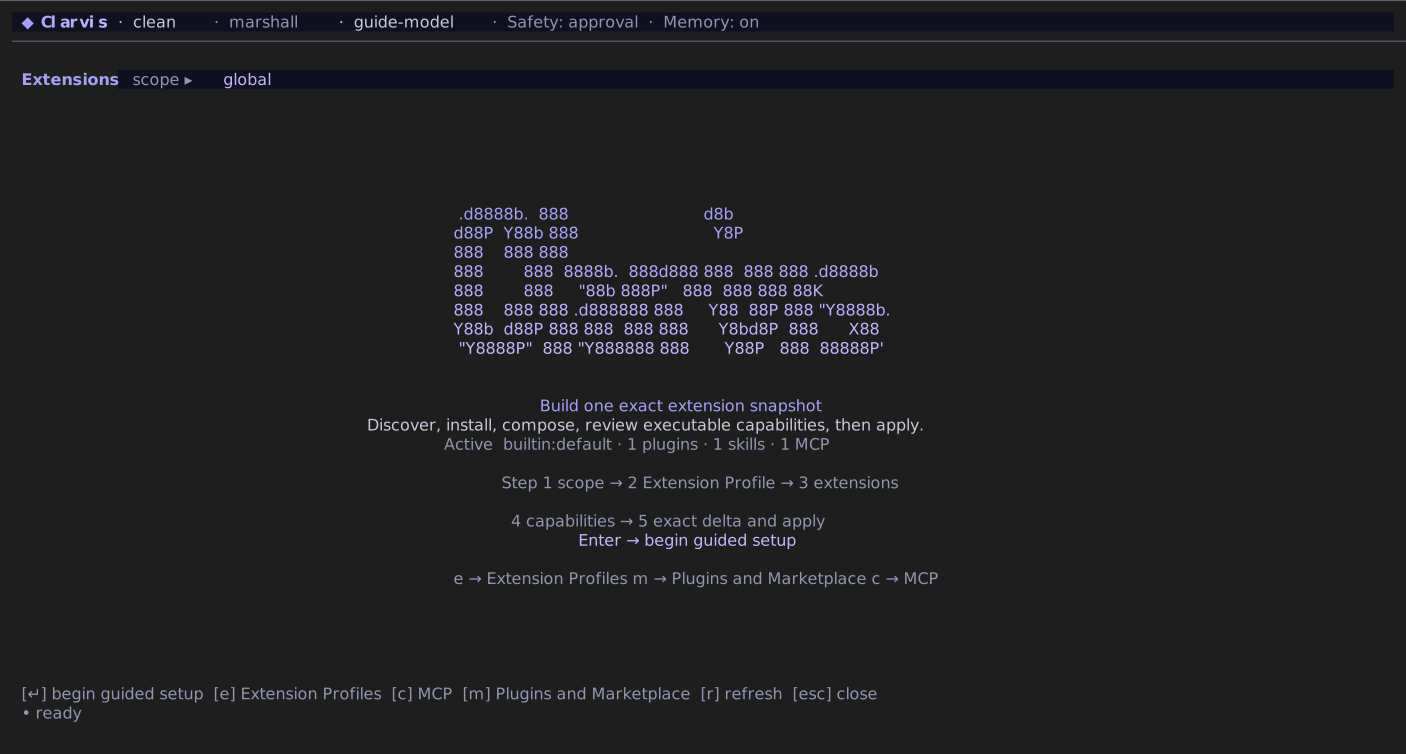
/extensions, then choose Plugins and Marketplace.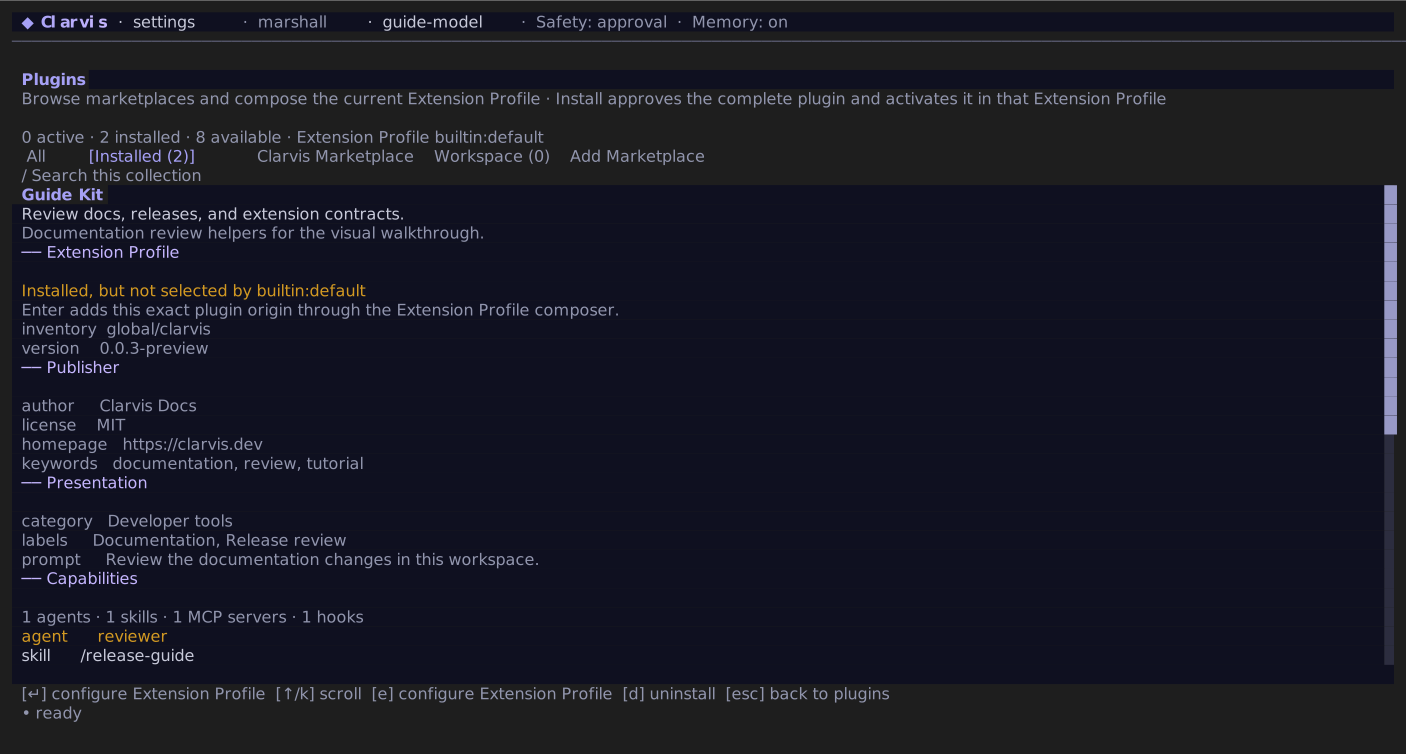
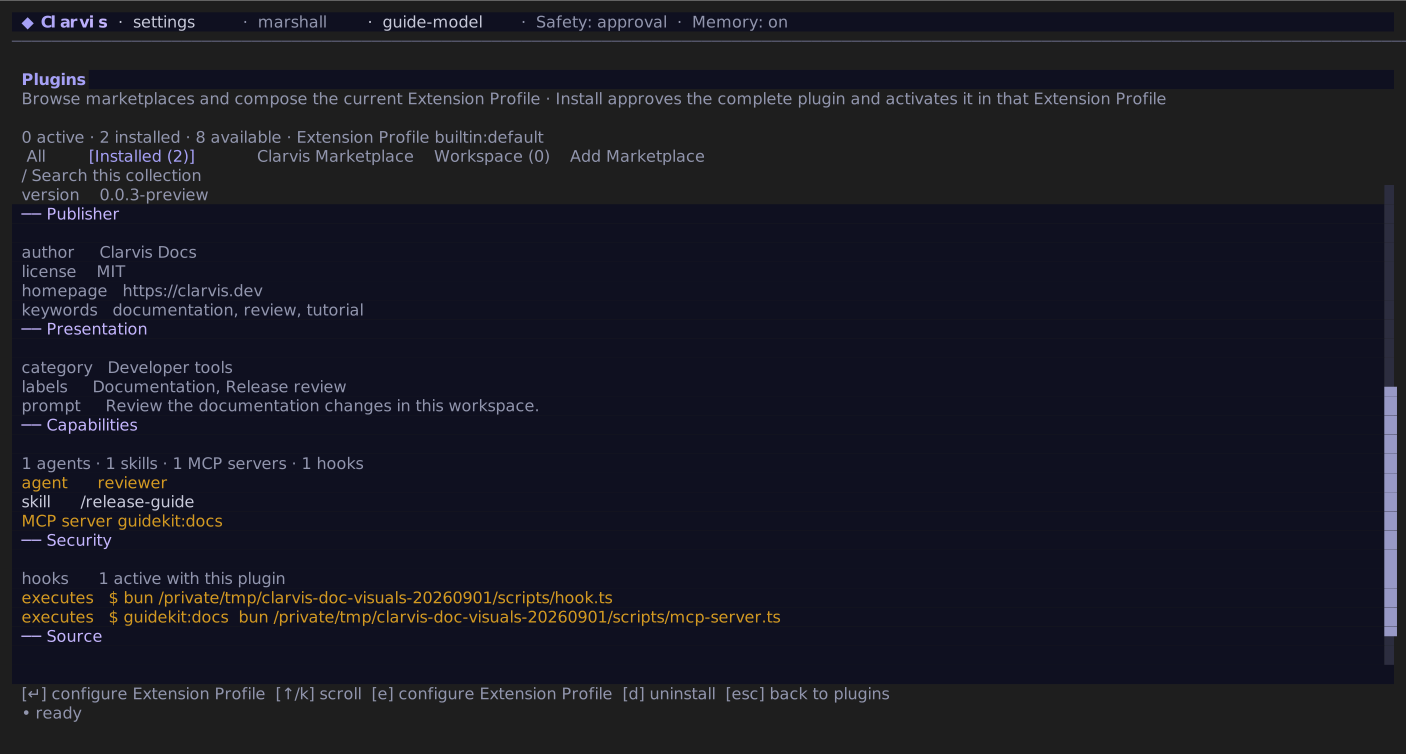
A direct Git install asks whether the checkout belongs in .agents/plugins (the shared Agent Plugins convention) or .clarvis/plugins (the Clarvis-native inventory). Marketplace listings install into the shared .agents/plugins inventory. In both cases, installation is explicit consent for the complete plugin and adds that exact installation to the current Extension Profile. It does not require a second plugin or hook approval screen.
Global installations are operator-owned and need no additional workspace approval when an Extension Profile selects them. Repository-owned plugins are different: after the lightweight first paint, Clarvis fingerprints the complete workspace plugin inventory, including plugins not selected by the current Extension Profile. One approval covers that exact inventory for every Extension Profile; any fingerprinted contribution-byte or tracked executable-mode change invalidates it. In a mixed Extension Profile, approved global plugins stay active while unapproved workspace plugins are withheld.
The footer shows the current operation and elapsed time during installation, updates, removal, and reconnection. Wait for it to finish before making another change.
Press u to update a managed global Git installation to its origin's current HEAD. Press d to uninstall a global plugin. If the changed plugin is selected by the active Extension Profile, Clarvis recomposes the backend; uninstalling it leaves that Extension Profile visibly degraded until the reference is removed or the plugin is installed again. Clarvis blocks updating or removing a selected plugin while a run is active so its pinned snapshot cannot change underneath it, and the kernel prevents a new run from racing the mutation. If a selected plugin is changed through a client that does not perform the TUI reconnect, that stale kernel refuses later runs until /reconnect. Workspace plugins are part of the repository, so remove them from the repository instead. A symlink to an external checkout remains visible and activatable, but Clarvis does not offer or perform a managed update against that linked target.
One atomic plugin boundary
A plugin is selected as one unit: its agents, skills, MCP servers, hooks, and services enter and leave together. If installed content later changes, Clarvis holds the changed snapshot at an idle boundary and asks for review before it may enter; an in-flight run never changes underneath itself. The snapshot includes the bytes and executable mode of directly referenced package-local MCP, hook, and capability process files, not only their manifest declarations.
Create a plugin
A conventional plugin can be as small as this:
quality-kit/
├── plugin.json
├── agents/
│   └── reviewer.md
├── skills/
│   └── quality-check/
│       └── SKILL.md
└── hooks/
    └── hooks.json
Put plugin.json at the plugin root. Names use lowercase letters, numbers, underscores, and hyphens. A Git install uses the manifest name as its install directory. For an already installed multi-host layout, the directory is the runtime namespace; Clarvis can derive a missing manifest name from it:
{
  "name": "quality-kit",
  "version": "0.0.1",
  "description": "Review-oriented agents, skills, and checks.",
  "author": {
    "name": "Acme Engineering"
  },
  "mcpServers": {
    "checks": {
      "type": "stdio",
      "command": "quality-kit-mcp",
      "args": ["--stdio"],
      "resources": false
    }
  },
  "hooks": [
    {
      "event": "pre_finalize",
      "command": "bun run lint",
      "timeout_ms": 60000,
      "on_failure": "deny"
    }
  ],
  "bootstrapSkill": "quality-check",
  "capabilityRunPolicies": {
    "plans": {
      "skills": {
        "quality-check": "review"
      }
    }
  }
}
The only required native-manifest field is name. If present, version must be a non-empty string. You may declare hooks inline as above; when the manifest declares no hooks, Clarvis also looks for hooks/hooks.json. Relative files and directories named by a manifest must remain inside the plugin.
For a multi-host plugin, Clarvis accepts a root plugin.json and manifests under directories shaped like .<host>-plugin/plugin.json. A root manifest that claims the portable Agent Plugins schema is authoritative. Otherwise .clarvis-plugin/plugin.json is authoritative when present; without either, Clarvis selects the single readable manifest that declares the richest supported contribution surface. It never merges two host manifests. Put skill locations in skills as one relative directory or a list. Each location may be a collection or an individual directory that contains SKILL.md. Clarvis keeps at most four effective scan roots; an exhaustive list of direct siblings can be represented by their parent without making an undeclared sibling visible. Put MCP servers inline, name a companion document with mcpServers, or omit that key and use .mcp.json or mcp.json by convention.
Use Agent Plugin and Codex packages directly
Clarvis recognizes the portable Agent Plugins v1 package without conversion. A root plugin.json with the canonical Agent Plugins schema is authoritative, uses fixed root skills/ and mcp.json components, and applies the Agent Skills manifest rules:
{
  "$schema": "https://agent-plugins.org/schemas/1.0.0/plugin.schema.json",
  "name": "quality-kit",
  "version": "preview"
}
Each immediate child of skills/ must contain exact SKILL.md. Portable skill names use lowercase alphanumeric segments separated by single hyphens, contain at most 64 characters, and match their directory. Clarvis also validates the Agent Skills license, compatibility, string-valued metadata, and space-separated allowed-tools fields. Root mcp.json may declare stdio, streamable-http, or sse servers. Stdio servers receive client-managed PLUGIN_ROOT and PLUGIN_DATA; their two placeholders are expanded once in args, environment, and working directory. Persistent plugin data lives in Clarvis state rather than the installed checkout and survives an update. An invalid MCP document disables only MCP. An invalid server, including one that exceeds a Clarvis host limit after normalization, is discarded individually; an invalid server or skill never removes the other valid components.
Codex-style packages are also loaded in place: .codex-plugin/plugin.json, root .mcp.json, agents/, and skills/ need no repackaging. Manifest-relative paths such as ../skills resolve from .codex-plugin/ while remaining confined to the package.
Their .mcp.json may be a direct server map or wrap it under mcpServers or mcp_servers. A server with url and no explicit transport becomes HTTP, http_headers becomes headers, and supported camel-case OAuth fields become Clarvis's snake-case form. Portable Agent Plugin MCP values expand only the host-owned PLUGIN_ROOT and PLUGIN_DATA placeholders before general expansion is disabled; explicit credential references still resolve through Clarvis's normal credential seam.
Map a borrowed-host userConfig value safely
A borrowed-host manifest may declare a string user setting and map it to one whole stdio environment value:
{
  "userConfig": {
    "apiKey": { "type": "string" }
  },
  "mcpServers": {
    "service": {
      "command": "service-mcp",
      "env": {
        "SERVICE_TOKEN": "${user_config.apiKey}"
      }
    }
  }
}
Clarvis translates that exact value to ${SERVICE_TOKEN} and obtains the value from the operator's environment; it never imports a manifest default or secret marker. Embedded references, command arguments, headers, undeclared or non-string settings, and servers with expandVariables: false withhold only the affected MCP server. Healthy sibling contributions remain available.
Compatible event-keyed hook documents may be wrapped in a hooks object, referenced by path, or placed at hooks/hooks.json. Clarvis translates their event names, tool matchers, plugin-root placeholders, timeouts, and supported verdicts into the same normalized hook definitions used by a native manifest. Anything that cannot be translated is reported in plugin details instead of silently widening a matcher. If a translated command starts with a relative executable such as ./hooks/session-start.cmd, Clarvis anchors that executable to the installed plugin root. The hook still receives the workspace as its working directory, so project-relative work remains explicit.
Plugin command hooks receive PLUGIN_ROOT and PLUGIN_DATA together with the compatible CODEX_PLUGIN_ROOT and CODEX_PLUGIN_DATA aliases. Translated lifecycle hooks keep supported Windows commands, asynchronous execution, status text, output limits, and direct mcp_tool calls. Unsupported prompt or agent hook entries are reported and skipped rather than executed with broader authority.
bootstrapSkill names one skill from this plugin whose body should be available before the model responds. The review plan policy asks for planning review on that skill when both the skill and the selected Plans provider come from this plugin.
Understand names and exact identities
Clarvis qualifies contributions that must be globally unique:
- agents become
<plugin>:<agent>; - MCP servers become
<plugin>:<server>, and their tools become<plugin>:<server>.<tool>; - skills keep their skill name and follow normal skill precedence.
For example, the manifest above contributes the MCP namespace quality-kit:checks. An agent named reviewer.md is addressed as quality-kit:reviewer. Enabling the plugin makes every tool actually advertised by quality-kit:checks available to every effective agent in new runs; you do not edit an agent profile to opt into that MCP server. The saved agent profile remains unchanged. If global or workspace settings replace that exact MCP namespace, the operator declaration wins and remains available only to profiles that select its tools; it does not inherit the plugin's automatic grant.
Global plugins may live under ~/.agents/plugins/<name> or ~/.clarvis/plugins/<name>. A repository may carry workspace plugins at .agents/plugins/<name> or .clarvis/plugins/<name>. All four are equally discoverable and activatable with or without a custom Extension Profile. Every reference is exact: { scope, source, name }, where source is agents or clarvis. A same-name install never shadows or substitutes for another; selecting two at once is invalid because contribution namespaces use the plugin name. An inventory entry may be either a directory or a symlink to a shared plugin directory; all contributed paths remain confined to that resolved package. Linked external checkouts are discovery-only and must be updated in their owning repository. Your global and workspace settings always outrank plugin contributions.
Upstream author or publisher identity, license, homepage, repository and legal URLs, keywords, capability and prompt descriptions, category, colors, and bounded interface assets remain available in plugin details. They are presentation metadata only; they never grant tools, start processes, or bypass trust.
Packaged skill resources are fingerprinted with limits of 8 MiB per file and 32 MiB in aggregate per plugin. A skill's helper-execution boundary is its own directory, not the collection or whole plugin, and its optional sidecar MCP dependency must name a server that is actually available in the active Extension Profile.
Know what Clarvis accepts
settings.json is strict: an unknown top-level setting is an error. plugin.json is intentionally tolerant so a cross-tool plugin is not rejected only because it carries foreign metadata. Clarvis reports unknown manifest keys but does not act on them. A misspelled key can therefore leave a contribution inactive even though the plugin loads; review the notes in the plugin browser.
Enable only code you trust
Plugins may contribute executable MCP servers, agents with their own grants, capability services, and hooks that run with your privileges. Installing from Plugins is consent for that complete unit. Repository-controlled plugins additionally require the exact workspace fingerprint review before their changed content can enter.