# Extension Profiles
> Select a deterministic set of already-installed plugins and standalone skills without mixing it
> with agent profiles, settings, permissions, or secrets.
An Extension Profile answers one question: **which installed extensions should be available to new
runs?** It is a named, deterministic allow-list that you can review, share, select, and diagnose.
It does not choose a model or agent, change sandbox or grants, store secrets, or pin plugin versions.
Discovery and installation are separate from activation. The `/extensions` composer can install a
marketplace plugin while you build a draft, but the plugin remains inactive until you review and
apply the complete profile delta.
## Start with the builtin default
`builtin:default` is virtual and immutable:
- `enabledPlugins` selects exact `{ scope, source, name }` plugin installations;
- enabled plugins contribute all of their agents, skills, MCP servers, capability services, and
hooks;
- tools advertised by those plugin MCP servers become available to every effective agent in new
runs without editing the saved agent profile;
- all four standalone skill roots are available with their existing precedence.
Use a custom Extension Profile when you need an isolated allow-list that cannot inherit a plugin from the
builtin activation list.
## Compose and select in the TUI
Open `/extensions` and press Enter. Clarvis guides the complete change as five decisions:
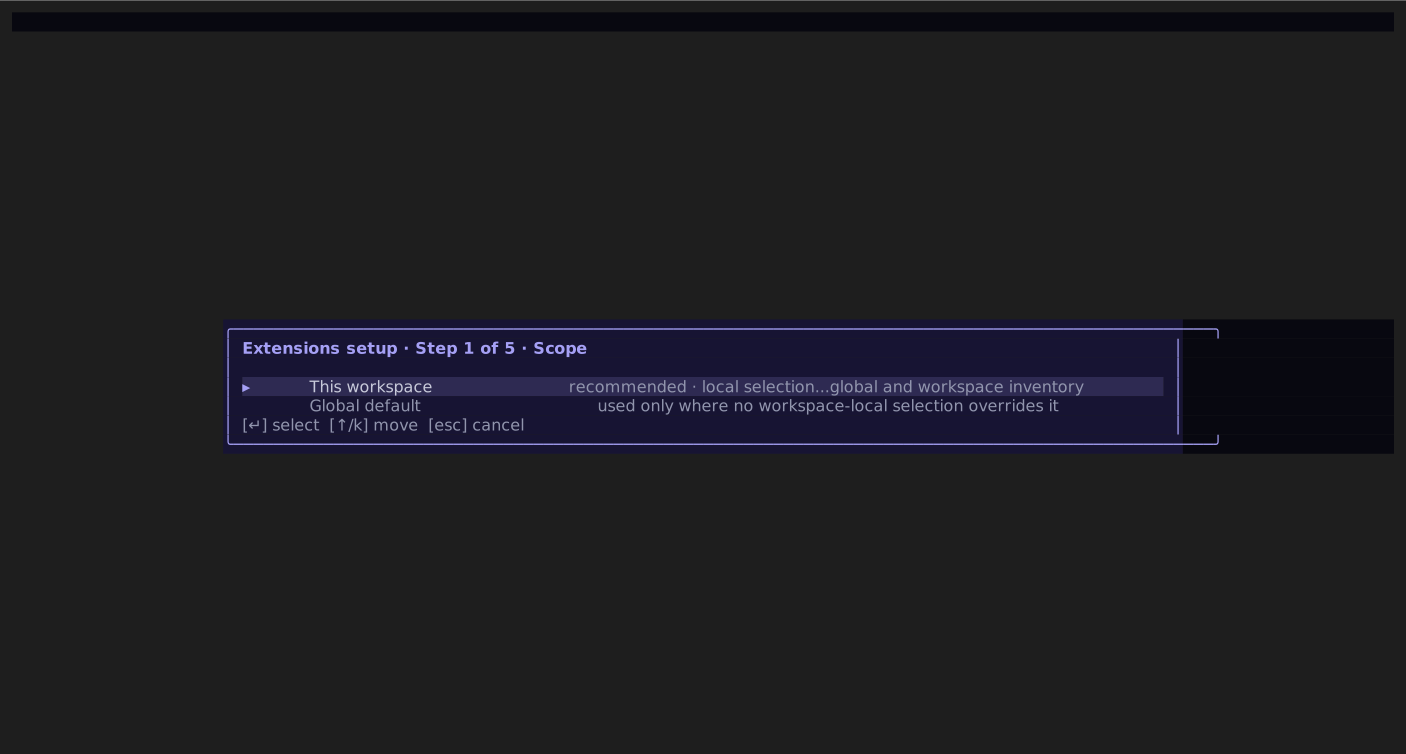
1. choose whether the selection is local to this workspace or the global default;
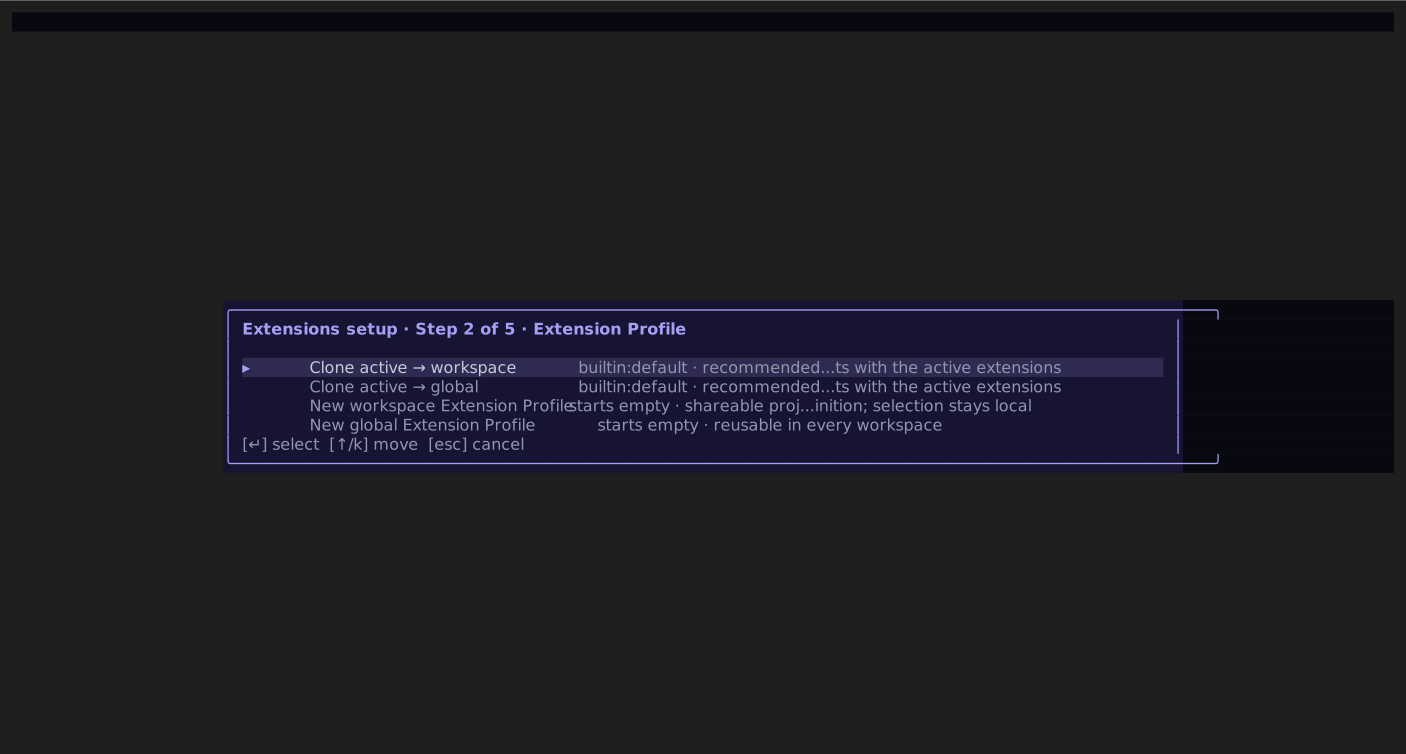
2. edit an existing Extension Profile, clone the active snapshot, or start an empty definition;
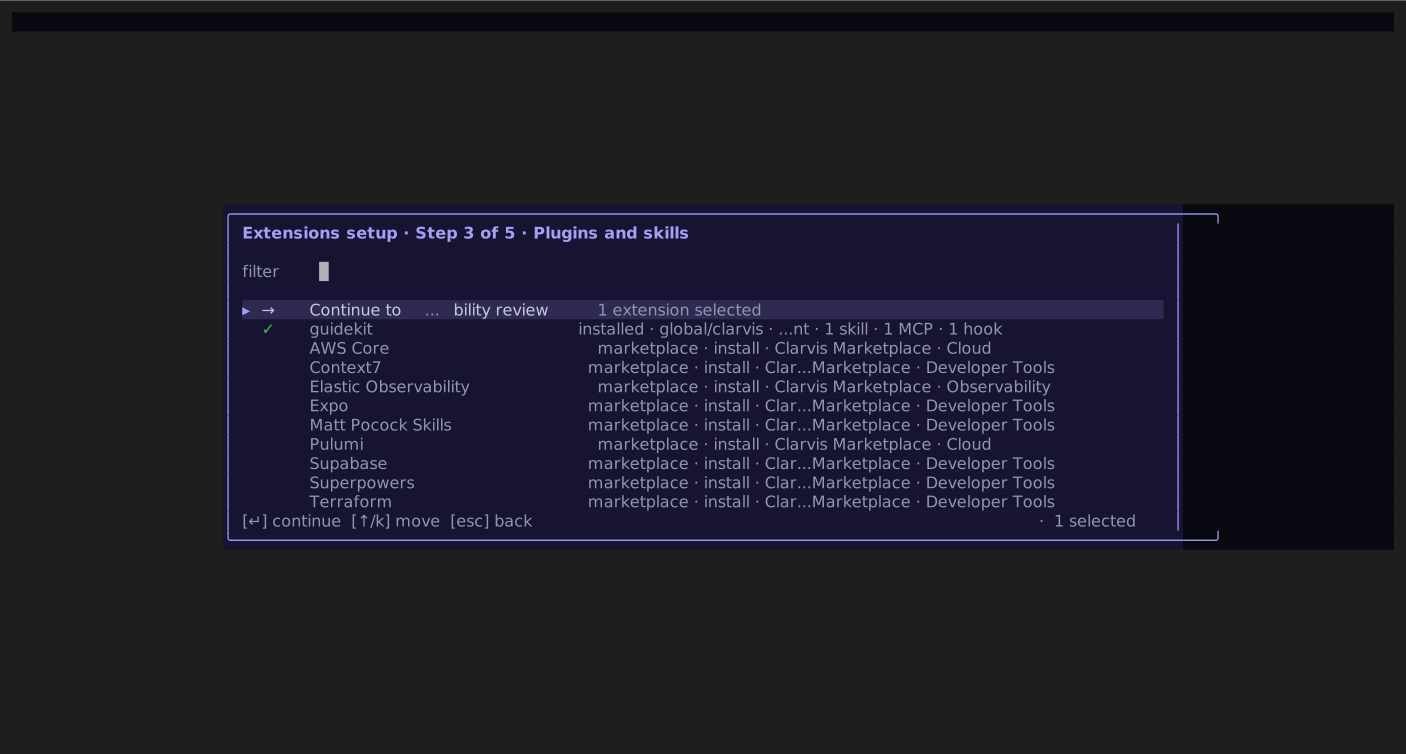
3. search marketplace listings, exact installed plugins, and standalone skills in one picker;
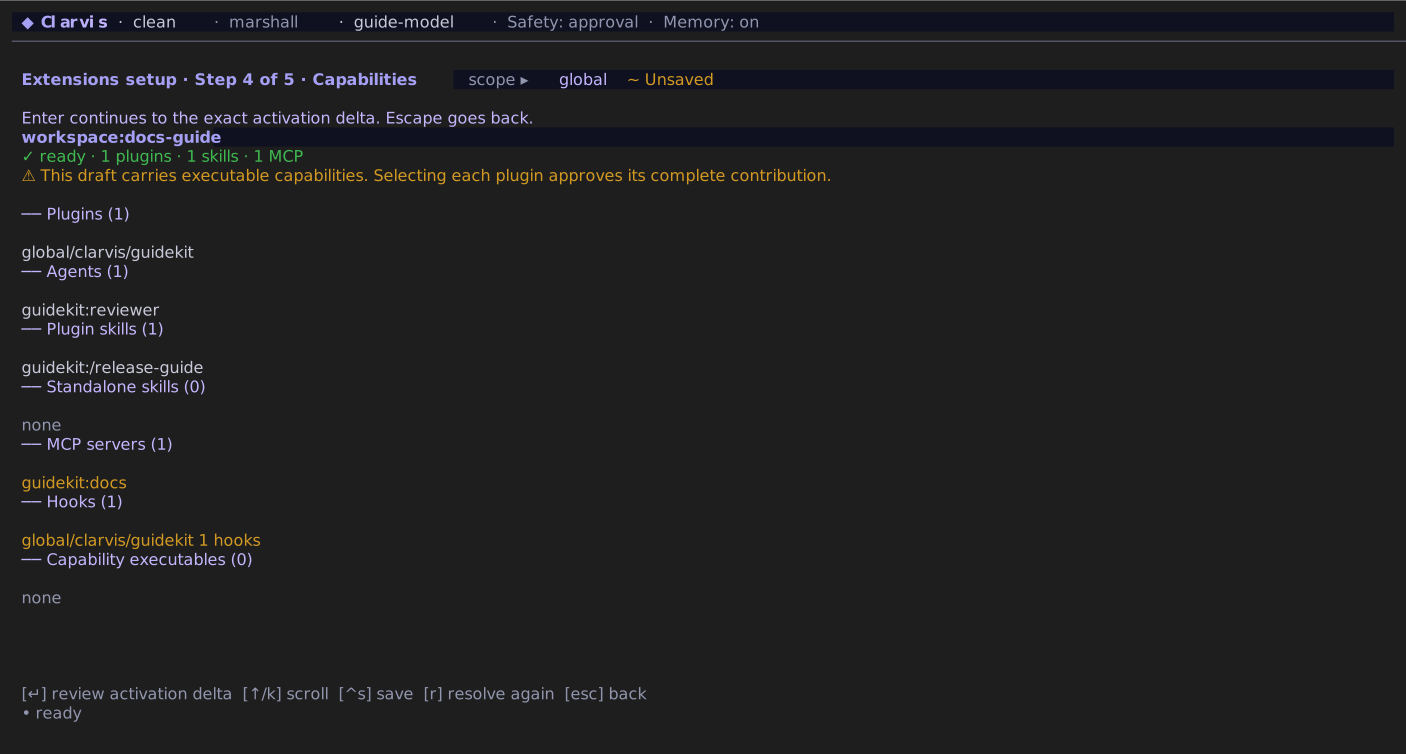
4. review every agent, plugin skill, standalone skill, MCP server, hook, and capability executable;
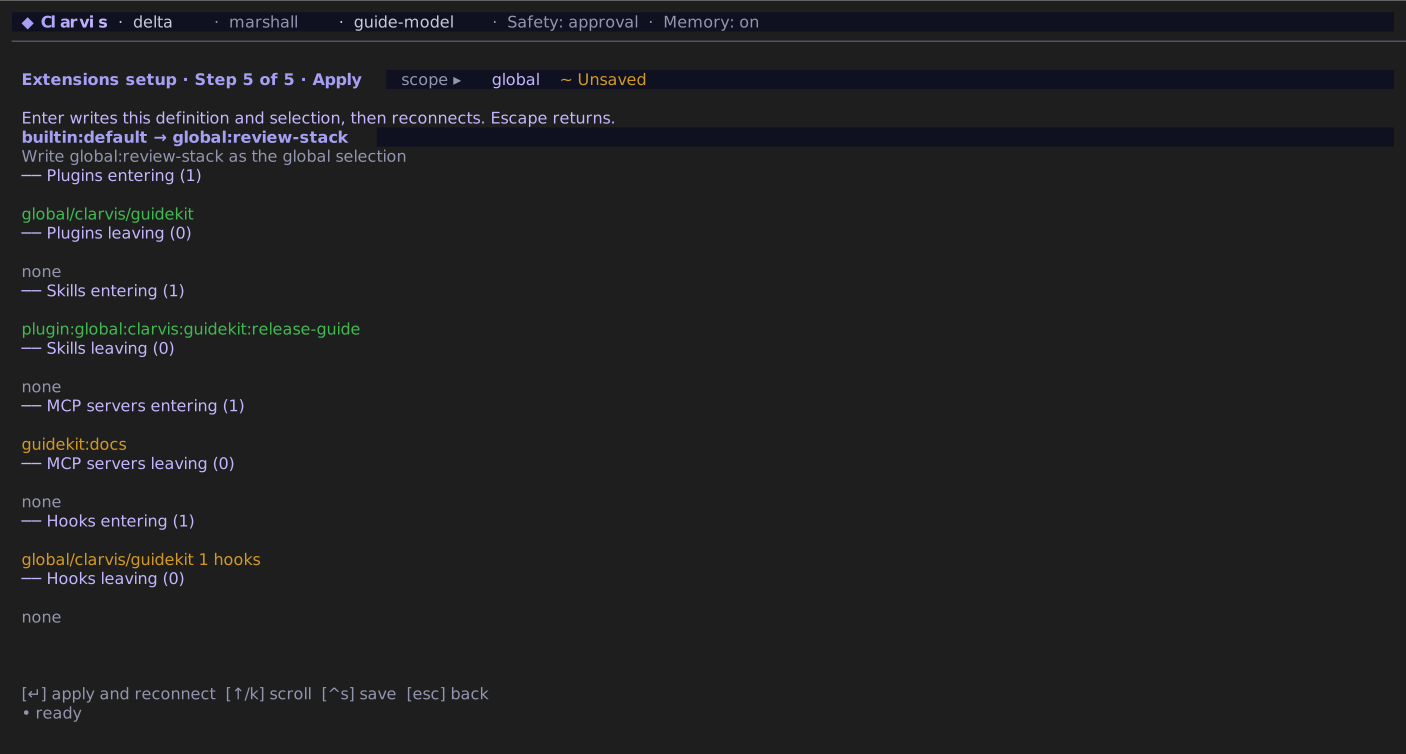
5. review the complete activation delta, approve the exact workspace fingerprint when required,
then apply and reconnect.
Step 1 — scope. Decide where the selection belongs before editing any definition.Step 2 — definition. Edit, clone, or start from an empty allow-list.Step 3 — extensions. Search one inventory and stage exact plugins or standalone skills.Step 4 — capabilities. Review the complete executable surface, not only plugin names.Step 5 — exact delta. Confirm the preview before Clarvis writes, reconnects, and activates the snapshot for new runs.
Step 3 keeps the draft in memory. Enter adds or removes an installed plugin or standalone skill;
on a marketplace row it first asks for `.agents/plugins` or `.clarvis/plugins`, installs the plugin,
and stages the exact returned installation. Installation is immediate, but nothing becomes active
until step 5. Escape returns one level; if the draft changed, Clarvis asks before discarding it.
Applying writes the complete Extension Profile definition and local selection as one preview-bound
operation. If the definition, selection documents, or installed contribution bytes changed after
review, Clarvis refuses the stale preview. A successful apply reconnects the backend and affects
only new runs; an in-flight run keeps its original snapshot. Plugin hooks follow their selected
plugin atomically.
Install, capability resolution, Apply, reconnect, and final refresh show an animated spinner with
elapsed time. The label advances only when the corresponding host operation finishes; Clarvis does
not invent percentage progress. Local setup actions stay suspended until the operation settles.
From `/extensions`, press `e` for the Extension Profile diagnostic and selection browser. It shows the
active Extension Profile, fingerprint, selection source, installed versus active counts, every resolved
contribution, and any issue. Press `/` to search definitions and Enter to open the selected
snapshot in a scrollable detail view.
| Key | Action |
| --- | ---------------------------------------------------------------------------------- |
| `w` | Preview the delta, then use the selected Extension Profile only in this workspace. |
| `g` | Preview the delta, then make a global or builtin selection the global default. |
| `n` | Start the guided composer for a new Extension Profile. |
| `e` | Configure the selected definition, or customize a clone of `builtin:default`. |
| `x` | Clear this workspace's local selection and preview the fallback. |
| `d` | Delete the selected inactive custom Extension Profile after confirmation. |
| `r` | Refresh definitions and diagnostics. |
The advanced browser's selection preview names every plugin, skill, MCP server, and hook entering
or leaving while its footer keeps `y` apply and `n` cancel visible. No selection changes before
`y`.
Previews use the same precedence as activation. If a workspace selection already shadows the global
default, changing that global default previews the unchanged effective Extension Profile and no active
delta. A preview is bound to both selection documents; if either changes before confirmation,
Clarvis requires a fresh preview.
Use the guided composer to add or remove exact plugins and standalone skills. Plugin contributions
are atomic: selecting a plugin selects all of its agents, plugin skills, MCP servers, hooks, and
capability executables. The Extension Profile is the plugin activation boundary.
## Author a complete allow-list
Global definitions live at `~/.clarvis/extension-profiles/.json`. Workspace definitions live at
`/.clarvis/extension-profiles/.json` and may be committed to the repository.
```json
{
"schema_version": 1,
"description": "Research with browser and documentation",
"plugins": [
{ "scope": "global", "source": "agents", "name": "browser" },
{ "scope": "global", "source": "clarvis", "name": "github" }
],
"skills": [{ "scope": "user", "source": "clarvis", "name": "deep-research" }]
}
```
`plugins` and `skills` are complete allow-lists, not additions to `builtin:default`. Plugin refs
qualify scope (`global` or `workspace`) and source (`agents` for `.agents/plugins`, `clarvis` for
`.clarvis/plugins`); another same-name installation is never substituted. Standalone skill refs
qualify both scope (`user` or `workspace`) and source (`agents` or `clarvis`). A global Extension Profile
may reference only global plugins and user-scoped skills. A workspace Extension Profile may combine all
four plugin inventories.
Definitions do not inherit. Clone an Extension Profile when you want a variation.
## Understand selection and sharing
Clarvis resolves the active Extension Profile in this order:
1. `--extension-profile` for this process;
2. the local selection for this workspace;
3. the global default selection;
4. `builtin:default`.
Use a qualified selector when scope matters:
```bash
clarvis --extension-profile global:research
clarvis --extension-profile workspace:project -p "Review this change"
```
A bare name checks the workspace definition first, then the global one. `--extension-profile` does not persist a
choice, and the running process cannot overwrite its local or global selection while the override is
active.
Workspace definitions are shareable, but the active choice is always machine-local under Clarvis
state. Cloning a repository therefore cannot activate its Extension Profile by itself.
## Diagnose trust and drift
An Extension Profile is `ready`, `degraded`, or `invalid`:
- a missing plugin or standalone skill is `degraded` and stays visibly inactive;
- an invalid definition or selection is `invalid` and never falls back to a broader default;
- an Extension Profile that selects an unapproved repository-owned plugin is `degraded`, while any
selected global plugin remains active.
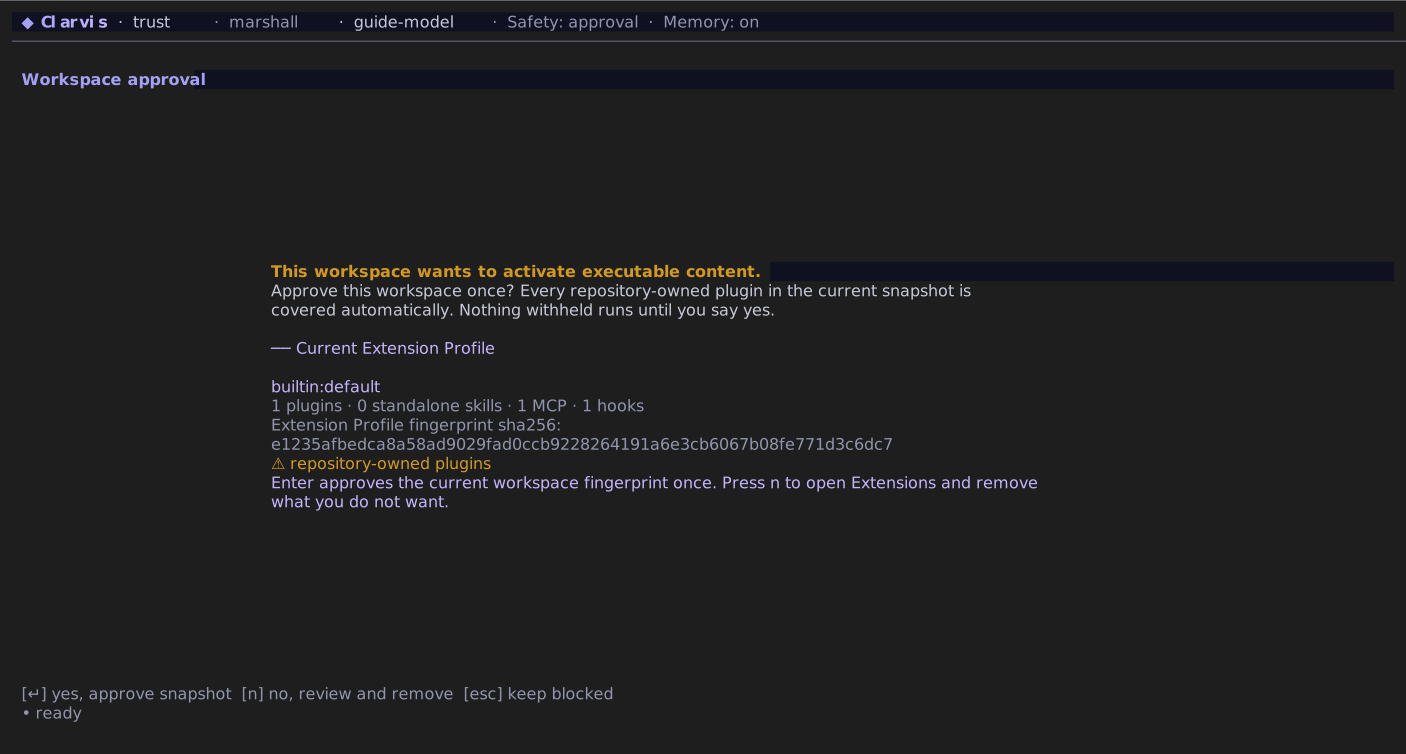
After the lightweight startup composer paints, Clarvis proactively fingerprints every installed
workspace plugin, whether the active Extension Profile selects it yet or not. One approval covers that
exact repository inventory across Extension Profile switches. Changing any workspace plugin byte or
executable mode that belongs to the fingerprinted contribution surface changes the fingerprint and
requires review again; editing only the Extension Profile allow-list does not. Global plugins are
operator-owned installations and need no second workspace approval. Declining opens Extensions so
the operator can remove unwanted contributions, and `/workspace-trust` remains a later fallback for
review or revocation.
Workspace trust names the exact fingerprint and executable contribution inventory before approval.
Clarvis refuses to approve or revoke workspace trust while a run is active, before changing the
trust record. When no run is active, that decision causes the selected workspace Extension Profile, or the
workspace-derived parts of `builtin:default`, to be recomposed before the next run.
The kernel pins the resolved extension snapshot. Its fingerprint covers exact plugin manifests and
companion MCP/hook declarations, install provenance and resolved source revision, agent files,
packaged skill bodies and resources, selected standalone skill bodies and resources, and the
applicable trust state. If any selected contribution changes after resolution, later contribution
access fails closed until `/reconnect`; changed plugin or skill bytes never enter under the old
fingerprint. Runs, traces, and session turns record the Extension Profile id and fingerprint. Resuming a
session under a different fingerprint shows a warning instead of pretending the extension surface
is unchanged.
## See also
- [Extensions overview](/guide/extensions)
- [Plugins](/guide/plugins)
- [Skills](/guide/skills)
- [Scopes and workspace trust](/explanation/scopes-and-trust)
- [Extensions reference](/reference/extensions)
- [Commands](/reference/commands)
---
[Canonical HTML](https://clarvis.dev/guide/extension-profiles)
[Documentation index](https://clarvis.dev/llms.txt)